
Name-Based Case Searches
The county website offers no trial-court name search. So begin by sorting the matter into the right court. Is it a 46th District Court case, a constitutional County Court matter, something before the Foard County Justice of the Peace, a Crowell Municipal Court citation, or an appeal in the Seventh Court of Appeals? A bare name with no court or date can send you to the wrong office, since several Foard County courts each handle their own case types.
- Read the summons, pleading, citation, notice, or order for a court name and case or cause number.
- For statewide civil, filing, document, or hearing coverage, sign in or register at re:SearchTX and select the relevant search mode.
- Apply the live portal’s filters. Search results and available fields can vary with the signed-in interface and participating data.
- For a Crowell citation, use the city-linked municipal portal and its exact-number search rather than a general name query.
- If the search fails, contact the correct custodian with the full name, approximate filing or violation date, case type, and court.
- Open a plausible result and compare the court, style, filing date, and cause number before treating it as the intended case.
A name match is only a lead. It proves neither identity nor how a case turned out. For your own matter, trust the filed notice and the clerk's record as the points of comparison.
Choose the Foard Court First
The combined Foard County and District Clerk splits its work between two courts. Its District Clerk side holds 46th District Court cases. Those run from felonies and major civil suits to family, juvenile, and other district matters. The County Clerk side handles County Court work. That work spans criminal, civil, probate, juvenile, and mental-health cases. Justice and municipal courts each keep their own lower-court dockets.
| Court route | Typical matter | Search starting point |
|---|---|---|
| 46th District Court | Felony, major civil, family, juvenile | District Clerk or re:SearchTX where covered |
| Foard County Court | County criminal, civil, probate, mental health | County Clerk or statewide coverage where available |
| Justice of the Peace | Class C, traffic, eviction, debt, small civil | JP office |
| Crowell Municipal Court | City ordinance, Class C, municipal traffic | Official nCourt exact-number search |
| Seventh Court of Appeals | Appeals from the region | Official appellate case search |
Picking the court first narrows a Foard County docket search fast. It also tells you which office can explain a blank or restricted result. One shared clerk building does not mean one merged set of court records.
Case Number Searches
The exact number is the strongest key you can bring to a docket search. Foard County publishes no single trial-court number format. Never guess at year, case-type, or sequence patterns. Type the number just as the court issued it. Keep letters, punctuation, and leading digits unless the official portal says otherwise.
The municipal portal in Crowell offers one verified example of this practice. A citation may carry a letter suffix. An example is 123456A, and the portal says to include that letter. A citation may start with zero. If that search fails, the portal advises retrying without the leading zero. Those tips fit the Crowell municipal system alone. They do not apply to district, county, justice, or appellate cause numbers.
Call the combined clerk at (940) 684-1365 and name the court along with the number. With no number in hand, give the exact party or style, the record type, and a rough filing date. Ask the clerk to confirm the identifier before you order a docket sheet or filed document.
Crowell Number Search Rules
For a straight municipal lookup, start at the official Crowell nCourt record search. It is the clearest public option. It lists Crowell Municipal Court at 114 E. California, P.O. Box 250, Crowell, TX 79227, with the court phone (940) 684-1014. The portal handles municipal citations, cases, records, and payments. It is not the Foard County District Clerk or County Clerk docket.
| Field label | Type | Required | Format note |
|---|---|---|---|
| Citation Search | Tab | No | Opens the citation or case workflow |
| Citation/Ticket Number | Radio | One of two | May include a required letter suffix |
| Case/Cause Number | Radio | One of two | Use the number assigned by the municipal court |
| Enter Citation/Case Number | Text | Unspecified | Try without a leading zero only if the portal directs it |
| Record Search | Tab | Unspecified | A separate record-search entry point |
The source interface appears in the official capture:
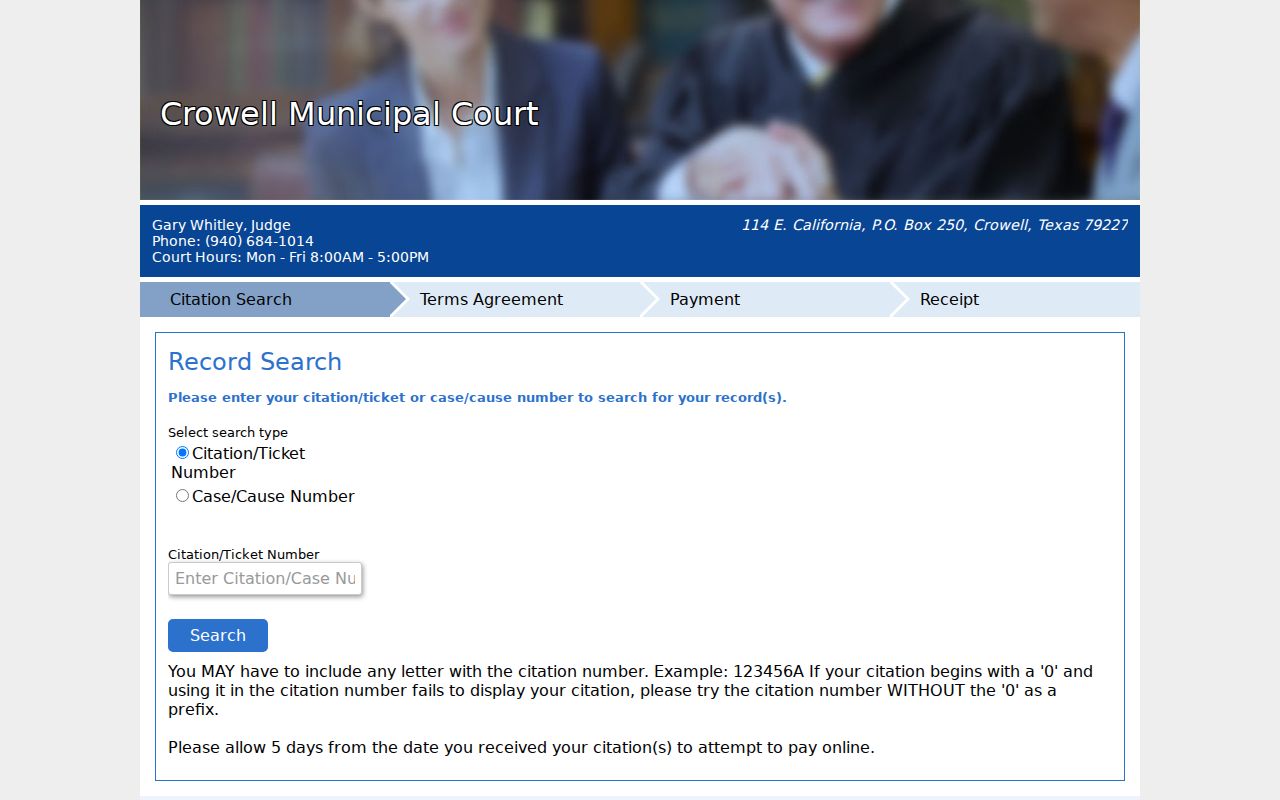
The portal stays municipal in scope. That is why an exact citation or case number matters so much here.
Case Search Results Explained
A case search result is a doorway, not the whole file. State materials lay out case details, filings, and hearing details. The clerk's side covers docketing and indexing. It also has custody of the filed court papers. A docket line can exist on its own. The linked image may be unavailable, redacted, restricted, or behind a copy charge.
| Case or Cause Number | The court’s identifier. Match it to the court and source paper. |
|---|---|
| Style or Parties | The case caption or descriptive name. Similar names require more checks. |
| Filed Date | The date the case or filing reached the court, not necessarily the event date. |
| Case Category | The broad type, such as civil, family, criminal, probate, or juvenile. |
| Docket Event | A dated line for a filing, setting, order, or other procedural act. |
| Hearing | A listed setting whose date, time, court, and place should be confirmed. |
| Disposition | The recorded outcome or status. Do not infer its meaning from an unknown code. |
No result certifies what is inside the record. Ask the custodian for a certified copy when you need an authenticated court record. Foard County posts no court-case copy fees or turnaround times, so expect to ask.
Five-Day Crowell Posting Caution
Crowell's portal asks for five days from issuance. Only then does a citation show up for online payment. A blank result inside that window proves nothing about the citation's validity. Recheck the number. Keep the suffix, and try the leading-zero tip if it fits. If the record still does not appear, call Crowell Municipal Court.
No result yet? Use the five-day note only for Crowell municipal citation posting, not as a deadline for every Foard County court.
The portal also takes payments by phone at (844) 544-6316. Payment access is not the same as a full public docket, though. For the current court date, disposition, or a record copy, call the municipal court at (940) 684-1014.
Two Ways to Search: County and State
The county website lists no public trial-court search URL. On the local side, then, a Foard County docket search means a clerk or court inquiry. It is not a county portal someone invented. The statewide side is re:SearchTX. After sign-in, it may help with civil cases, filings, hearings, and available documents. Its own reporting says the document collection excludes criminal case records. Foard coverage there is not promised, so treat it as a maybe.
| Search point | Foard clerk or court | re:SearchTX |
|---|---|---|
| Best use | A known local court and record request | Participating statewide case, filing, text, or hearing search |
| Access | Phone, counter, mail, fax, email, or court contact | Registration or eFileTexas sign-in |
| Criminal limits | Ask the criminal-record custodian | Official report says criminal case records are excluded |
| Documents | Ask for inspection, plain copy, or certified copy | Available documents may carry a fee |
| Coverage check | The responsible office can verify its record | A blank result does not prove no Foard case exists |
Use both layers where each fits. The Foard County clerk stays the authority on its own file. The state tool can widen a search across participating courts.
Foard Filing Tools Are Different
The names on the official e-file service-provider list tell you what Foard County actually runs. It lists the Foard County Clerk, County Court, District Clerk, 46th District Court, and Justice of the Peace. All of them sit in the iDocket/eFileTexas service path. County budgets even carry an "I Docket" software license line. That is real filing and case-management infrastructure. What it is not, on its own, is a free public Foard County docket search.
eFileTexas moves documents into the courts. The EFSP list simply helps filers pick the right route. The search layer sits elsewhere, in a separate statewide tool called re:SearchTX. Meanwhile, the local clerk system can run quietly behind the counter. A public web register never has to be part of it. So treat a filing endpoint as what it is. Push private case details through a filer login. You may hand them to the wrong form entirely.
One more thing worth doing. Ask the clerk directly about the public inspection route. Do not assume a filer account opens the docket to you.
Foard Search Fallback Chain
The online docket search may come up empty. Go to the court that holds the file. The Foard County and District Clerk sits at 101 South Main, P.O. Box 539, Crowell, TX 79227. Phone (940) 684-1365, fax (940) 684-1918, and clerk@foardcounty.texas.gov in the state directory. The County Court general line is (940) 684-1424. The Justice of the Peace answers at (940) 684-1917. For district matters, the district coordinator is (940) 552-7051.
Ask a specific question when you call. Find out whether the clerk offers in-person docket inspection. Ask about a public terminal, a printed docket sheet, or a mailed copy. Do not drive over expecting a terminal. A public one is not a given here. A written contact form can open an inquiry. But neither clerk form has a dedicated case-number field. Neither proves a formal copy request went through. Spell out the court, the cause number, and the exact record you want. Say whether a plain or certified copy will do.
Appellate issues take a different tool. Use the Seventh Court of Appeals case search for those. Its official interface filters cases and documents by trial county and by trial court. That is handy when a matter has left Foard County.
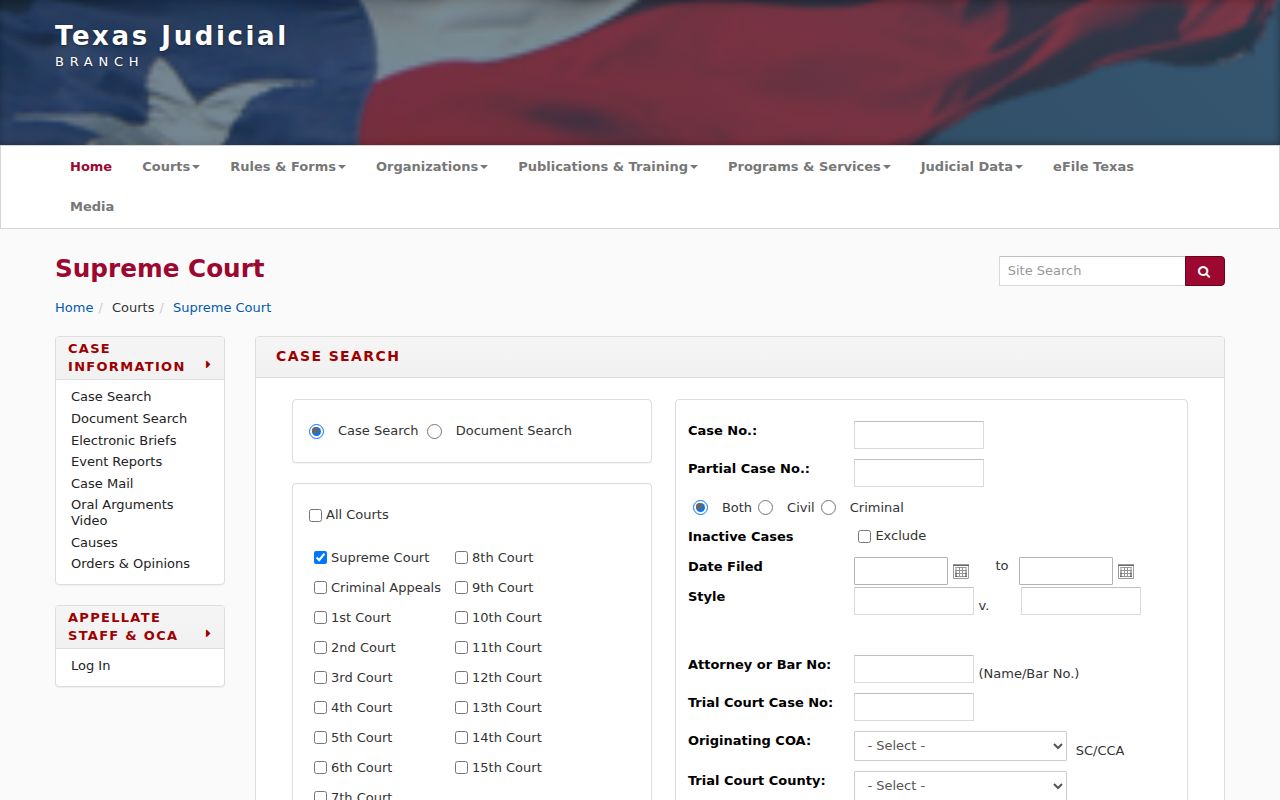
Remember what that appellate tool is. It is a separate record system, and it does not replace the trial-court docket that Foard County itself holds at the courthouse.
Which Cases Stay Restricted
A blank result can mean several things. Portal coverage may be thin, a posting may lag, the case may sit in another court, the file may be unindexed, or a legal restriction may apply. None of that proves a case never existed or was dismissed. So resist the easy conclusion.
Certain material rarely appears in full. Juvenile files, sealed civil records, confidential mental-health material, protected personal data, and anything closed by statute or court order may show up redacted or not at all.
The rules behind those limits are specific. Texas Rule of Civil Procedure 76a governs civil sealing and starts from a presumption of openness that its own test and process can overcome. Rule 21c handles redaction of sensitive identifiers. Family Code chapter 58 sets out juvenile confidentiality. None of this promises a public image of every document online.
Ask the clerk smart questions instead. Is the item sealed, redacted, juvenile, or confidential? Is it simply not imaged yet, outside the search collection, or held by another court? Request an accessible or redacted version if one exists. Never ask the clerk to disclose protected content. And never read a partial index as the outcome of a person's case.